
How to Handle Out-of-Stock Products: What Your Store Should Say Instead (2026)
The shopper who reaches an out-of-stock message is the most qualified visitor on your site — she found you, chose the product and selected her variant. This is about what happens in the next fifteen seconds.
Inventory accuracy is a solved problem. Inventory sufficiency never will be, because demand is lumpy and capital is finite. So the question was never how to avoid saying no. It is what the store says instead, and most stores say the same thing to five different situations: a grey button and an email field.
Should you hide out-of-stock products or leave them up?
Keep them live if the product is coming back, and redirect only when it is permanently gone.
Hiding or deleting a temporarily unavailable product throws away accumulated search equity, breaks inbound links, and produces a worse experience than an honest page. A shopper who arrives from a search result to a 404 learns nothing. One who arrives to “back on the 14th, and here is the closest thing we have in the meantime” can still be sold to.
The decisions in short:
| Situation | What to do |
|---|---|
| Temporarily out of stock | Keep the page live and indexable; show a date and alternatives |
| Variant out, others available | Keep the page; default to an available variant; explain the substitution |
| Discontinued, direct successor exists | 301 redirect to the successor, or keep the page with a prominent link |
| Discontinued, no successor | Keep live if it still attracts traffic, with category alternatives; otherwise 301 to the category |
| Seasonal, returning next year | Keep live; state when it returns |
Is it bad for SEO to keep out-of-stock pages live?
Keeping the page live is generally the correct choice, provided the availability status is marked up honestly and the page still offers the visitor something useful.
Search engines read availability from structured data, so mark it accurately rather than hiding it — misrepresenting stock status in markup is a worse outcome than admitting it. What tends to hurt rankings is not the out-of-stock status itself but the resulting page quality: thin content, no alternatives, high bounce, nothing for the visitor to do.
The practical rule: an out-of-stock page that offers a date, a substitute and a way to ask a question is a useful page. One that offers a grey button and an email field is a dead end, and behaves like one in both search performance and revenue.
For permanently discontinued products with a clear successor, a 301 redirect is usually better than either keeping or deleting, because it preserves equity and takes the visitor somewhere she can actually buy.
What should an out-of-stock product page say?
It should give a specific date, a substitute with a reason, and a way to ask a question — rather than only capturing an email address.
Four elements, in order of value:
- A real restock date. “Back on the 14th” is useful. “Back soon” is worse than silence, because it looks like an answer and contains no information.
- A substitute with an explanation. Not a generic carousel — a specific alternative and why it is the right one for what she asked for.
- A way to ask. Substitution is a judgement call, and judgement calls need a conversation.
- A notification option. Worth having, but as the fallback rather than the headline.
Most stores implement only the fourth.
What are the different kinds of “out of stock”?
There are at least five distinct situations, each needing a different response, and most stores render all of them identically.
- Temporarily out of stock — needs a date and, ideally, a hold.
- This variant out, others available — needs substitution with a reason. The most common case, and the most poorly handled.
- Discontinued — needs the successor and an explanation of what changed.
- Won’t arrive in time — a date problem rather than a stock problem. Needs expedited shipping, a faster alternative, or an honest answer on the page rather than a discovery at checkout.
- Not available in her country — often solvable via a partner, a forwarder or a different variant; almost never addressed beyond a blocked checkout.
Auditing which of these your store actually produces, and in what proportion, is usually more valuable than optimising any single message.
The audit is quick. For a week, log every unavailable-variant impression against which of the five it was. Most brands find the distribution is lopsided and not where they expected — a footwear brand discovers nearly everything is case two, an equipment brand discovers most of it is case three, and a brand shipping internationally discovers case five is quietly larger than the rest combined. Fixing the largest bucket properly beats a generic improvement applied to all five.
Do back-in-stock notifications actually work?
They recover some revenue, but they convert a warm present-tense moment into a cold future one, which is why sign-up-to-purchase rates are usually well below what operators expect.
The mechanism is deferral. She wants it now; the notification proposes she come back in eleven days — when the occasion she was shopping for may have passed, when she has likely bought elsewhere, and when the email arrives in the middle of something else.
Measure the honest number. Not sign-ups, but the proportion of sign-ups that resulted in a purchase when the email went out. That figure is the true cost of treating deferral as the primary answer.
Keep notifications. Just stop treating them as the response to unavailability rather than as the last of four options.
There is a better version of the same idea, and it is not a broadcast. When a size lands, an associate who already knows a specific client — what she bought, what she returned, what she was waiting for — reaches out to her personally, by name, about that piece. That is outbound clienteling rather than an automated blast, and it is the difference between a queue of email addresses and a list of relationships. It is also the half of the answer a notification app structurally cannot provide, because it has the address and not the history. Digital clienteling covers how that record gets built and kept.
How do you recommend a substitute without annoying the shopper?
Reference what she asked for, explain the relationship between the two products, and be willing to say that nothing suitable exists.
“You may also like” fails because it is a shelf rather than an answer. It does not acknowledge her request, does not explain why this item is relevant, and reads as generic because it is.
A working substitution sounds like retail knowledge: the 41 in this style runs small — it fits closer to a 40 than our actual 40 does. That sentence contains information she cannot obtain from a size chart, and it is the reason the offer is credible. Boot and shoe brands live on exactly this kind of knowledge; it is the same material that decides whether a size and fit answer lands or reads as a guess.
The part most implementations miss: the mechanism must be able to fail honestly. If the right answer is “wait for Thursday, the alternatives are not right for you,” it has to be sayable. A substitution engine that always finds something to offer is a recommendation widget with better manners, and shoppers detect that within one exchange — which is exactly what destroys the credibility of the times it does have a good answer.
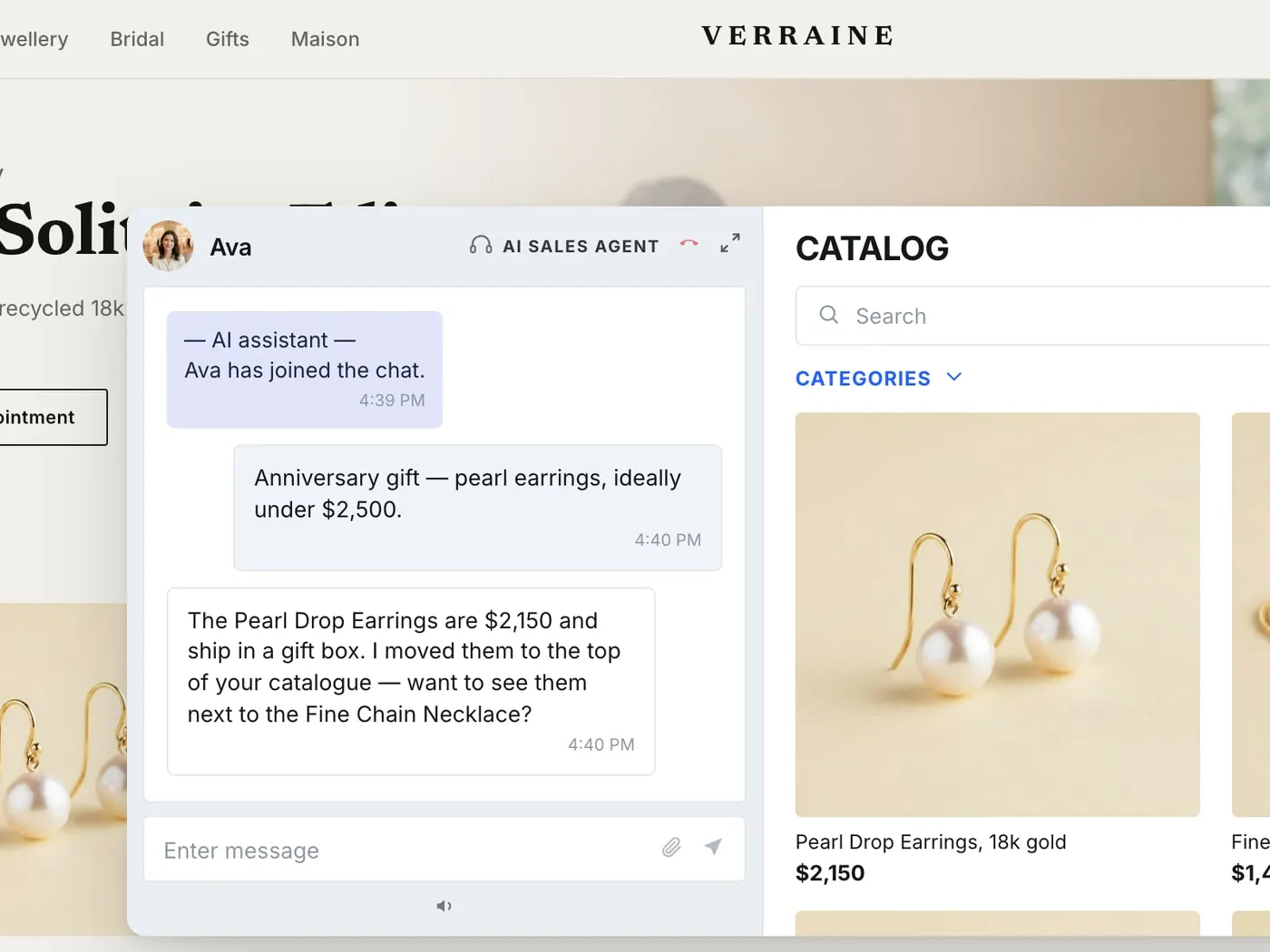
Writing the substitution knowledge down is a smaller job than it sounds. For each significant product, one or two lines describing how the nearest alternatives relate to it: which runs larger, which is the same leather in a different finish, which replaced it and what changed, which is the cheaper version and what you give up. That is the material an associate uses on the shop floor without thinking about it, and the material an AI sales agent needs in order to say something specific rather than something generic.
A useful test for whether you have written it well: could a new associate, on their first day, use only these sentences to make a credible counter-offer? If the lines only make sense to someone who already knows the range, they are notes rather than answers.
What should you do when search returns zero results?
Treat zero-results queries as a weekly inbox, because a large share of them are for products you actually sell under different names.
Common causes: the shopper used a category word you do not use (“jumper” versus “knit”), searched a model number when you list a retail name, searched a brand you stock but do not tag, or made a typo your search does not tolerate.
Practical fixes, in order:
- Read the log weekly. Sort by frequency.
- Fix synonym gaps immediately. These are bugs, not preferences.
- Enable typo tolerance if your search does not have it.
- Never return a blank page. Show close matches, popular items in the likely category, and a way to ask.
- Keep the second pile. Queries for things you genuinely do not sell are free demand research arriving hourly.
How do you handle “it won’t arrive in time”?
State the delivery cut-off on the product page, before she reaches checkout, and offer an alternative that can make the date.
Discovering at checkout that delivery misses the date is a worse experience than being told on the product page, because she has now invested the whole journey. And for gift shoppers the date is not a preference — it is the entire constraint.
What helps: an order-by date shown in plain words on the page, expedited options surfaced before checkout rather than inside it, and an alternative product filtered by what can actually arrive in time.
A six-step framework
Step 1 — Measure unavailable-variant impressions. Cross variant availability against pageviews. This is the size of the problem, and most operators have never seen the number.
Step 2 — Classify your noes. Work out which of the five situations your store actually produces, and in what proportion. Fix the largest bucket first.
Step 3 — Replace the grey button with a real page. Date, substitute with a reason, a way to ask, notification as the fallback.
Step 4 — Write the substitution logic as sentences, not rules. For each significant product, one line explaining how the nearest alternatives relate to it. This is what both a person and an AI sales agent need in order to make a credible counter-offer.
Step 5 — Turn zero-results into a weekly review. Fix synonyms; keep the demand log.
Step 6 — Put someone there for the judgement calls. Most substitution questions can be answered on the spot by an AI sales agent that knows the range. The rest are the ones where she wants to see two options compared before committing — a different leather, a half size up, the successor to a discontinued piece — and those want a person on live video who can hold both up to the camera and add the right one to the cart.
How do you measure recovery from unavailability?
Track unavailable-variant impressions, what happens in the session afterwards, and the conversion rate of notification sign-ups — not sign-up volume.
Four numbers worth watching monthly:
- Unavailable-variant impressions, as a share of product-page views. The size of the problem.
- Session continuation rate after hitting an unavailable variant. Did she look at anything else, or did the session end there? Short and terminal is the failure pattern.
- Substitution acceptance rate. Of the shoppers shown a specific alternative, how many bought it.
- Notification sign-up to purchase rate. The honest price of deferral.
Deliberately not a target: notification sign-ups. Optimising that number rewards deferring more sales, which is the opposite of the goal. If you want context for where the rest of your funnel sits while you instrument this, the 2026 ecommerce benchmarks are the honest version of that comparison.
Where to start
Every brand runs out of things. What separates the stores that lose the sale from the ones that keep it is not stock depth — it is whether anything happens in the next fifteen seconds.
Start by measuring unavailable-variant impressions. Most operators discover the number is larger than they assumed, and it makes the rest of the decisions easy.
The response that works is the one that stays human when the system has nothing to offer, personal enough to reference what she actually asked for, and measurable in something better than sign-up counts. Immerss covers that across its three modules: an AI Sales Agent that answers the substitution question on the page, Clienteling for the 1:1 conversation and the outbound follow-up when the size finally lands, and Video Commerce for the moments where two options need to be seen side by side rather than described.
If you want to see what that looks like against your own catalogue and your own out-of-stock rate, book a demo — we will walk your unavailable variants with you.
Frequently asked questions
Keep the page live, state a real restock date, offer a specific substitute with a reason it is the right one, and give the shopper a way to ask a question. A notification sign-up is worth having, but it belongs fourth rather than first. Most stores implement only the fourth and treat the other three as optional, which is why an out-of-stock page usually behaves like a dead end instead of a conversation.
It depends on whether the item is a replenishment line or a limited run, and the page should say which — that is the single piece of information the shopper actually came for. A core line returning on a known date, a seasonal item returning next year, and a discontinued piece that is never coming back call for three different responses, and rendering all three as the same grey button is what makes the page useless. If you do not yet know the date, say that you do not know rather than saying 'back soon'.
Lead with what you can do rather than with what you cannot, and be specific enough that the answer is checkable. 'Back on the 14th — the closest thing we have in the meantime is this, and here is how it differs' is a usable answer. 'Currently unavailable, sign up to be notified' is an apology with an email field attached. Specificity is what makes the message read as competence rather than as a system message.
Name the situation plainly, give a date if you have one, and follow immediately with an alternative or a next step. Professional here means informative rather than euphemistic — 'temporarily unavailable' and 'currently sold out' are both fine, while 'back soon' is worse than silence because it looks like an answer and contains no information. The tone that reads as professional is the one a good associate uses on the shop floor: honest about the constraint, immediately useful about the alternative.
Keep them live if the product is coming back, and redirect only when it is permanently gone. Hiding or deleting a temporarily unavailable product throws away accumulated search equity, breaks inbound links, and produces a worse experience than an honest page. A shopper who arrives from a search result to a 404 learns nothing; one who arrives to a stated date and the closest alternative can still be sold to.
Keeping the page live is generally the correct choice, provided availability is marked up honestly in structured data and the page still offers the visitor something useful. What tends to hurt rankings is not the out-of-stock status itself but the resulting page quality — thin content, no alternatives, high bounce, nothing for the visitor to do. For a permanently discontinued product with a clear successor, a 301 redirect is usually better than either keeping or deleting, because it preserves equity and takes the visitor somewhere she can actually buy.
Selectable, with an immediate explanation and alternatives. Greying out removes the shopper's ability to express what she wanted, which also removes your ability to respond to it — and to measure it. A greyed-out size tells you nothing about demand; a selected one that returns a real answer tells you which variants are costing you sales and how often.
Backorders work when the delivery date is reliable and clearly stated, and damage trust badly when it is not. If your restock dates slip regularly, an honest 'back on the 14th, we'll tell you when it lands' is better than a backorder you may miss. The deciding question is not whether backorders convert — they do — but whether your supply chain can support the promise you are asking the checkout to make.
Less than hiding them does. Every retailer runs out of things and shoppers know it; what reads as badly run is a page that offers nothing in response. A stated date and a sensible alternative reads as competence. The reputational damage from unavailability comes almost entirely from the silence around it rather than from the fact itself.
Say so and give a date. An honest 'nothing else we make does this job, it's back on the 14th' preserves more goodwill than an irrelevant recommendation, and it is exactly that credibility that makes your other suggestions worth listening to. A substitution mechanism that always finds something to offer is a recommendation widget with better manners, and shoppers detect that within one exchange.
It depends on variant depth rather than catalogue size. Few variants and deep stock, and this is a rounding error. Many sizes, widths or colourways — as in apparel, footwear and fine jewelry — and unavailable variants are often one of the largest single leaks in the funnel, because the shopper who hits one had already chosen the product.