
WooCommerce Conversion Rate Optimization: What Actually Moves the Number (2026)
Most WooCommerce CRO advice is a list of plugins. This is about which categories genuinely affect conversion, how to tell when your stack is working against you, and the one job no plugin in the ecosystem fills.
Why is my WooCommerce conversion rate lower than I expected?
The most common causes on self-hosted stores are unanswered pre-purchase questions, plugin-induced page weight, and a checkout carrying more steps than it needs — usually in that order of impact.
Self-hosting shifts responsibility for performance and defaults onto you. Nothing arrives improved unless you improve it. That is the trade you made for control, and it means a WooCommerce store’s conversion rate reflects the specific stack its owner assembled rather than a platform baseline.
The diagnostic order matters more than the list. Speed and checkout are visible, measurable and widely written about, so they get attention first. The answering gap is invisible in analytics, so it usually goes last or never — despite typically being the larger of the three.
What is a good conversion rate for a WooCommerce store?
There is no reliable universal figure, and the useful benchmark is your own trend rather than an industry average.
Conversion varies enormously by category, price point and traffic source, and most published benchmark numbers are aggregated across incompatible business models, frequently stale, and republished without a traceable source. A number you cannot trace feels like information while functioning as a rumour.
Three of your own numbers are worth more than any benchmark:
- Conversion rate by device, desktop and mobile measured separately.
- New versus returning visitors, and the ratio between them.
- Product-page-to-cart rate, measured separately from cart-to-completed-order.
Those tell you where the problem is. A percentile ranking does not. If you do want external context for the shape of the funnel rather than a target to hit, our ecommerce benchmarks breakdown is a more honest place to start than a blended industry average.
Which WooCommerce plugins actually increase conversions?
The plugin categories with a real effect on conversion are checkout simplification, page performance, product content and on-site search — plus, in most stacks, the uncovered job of answering shopper questions.
Categories that reliably matter:
- Checkout — field reduction, guest checkout, address autocomplete, express payment methods.
- Performance — caching, image optimization, script management. This matters more on WooCommerce than on hosted platforms because nothing optimizes by default.
- Product content — variant display, image galleries, size and specification presentation.
- Search and filtering — above roughly a hundred SKUs, on-site search quality is a conversion feature rather than a convenience.
Categories that are widely installed and rarely decisive: discount wheels, exit-intent popups, countdown timers and social-proof notification bars. These are not worthless, but they compete for one moment of attention, and stores frequently run three of them at once. We have written more broadly about how to choose between categories in our ecommerce CRO tools framework.
Are free WooCommerce conversion plugins good enough?
For most conversion categories, free plugins are adequate, and the meaningful costs are maintenance and abandonment risk rather than features.
The realistic differences are faster security patching, a clearer update cadence, actual support when something breaks after a WordPress core update, and a lower chance of the developer walking away. For a plugin sitting in your checkout path, those things are worth more than the feature list.
A practical rule: use free plugins freely for anything cosmetic or non-critical, and pay for anything in the payment or checkout path, where an unpatched vulnerability or a silent breakage costs real money.
How many plugins is too many for WooCommerce?
There is no correct number — the useful test is whether any job is covered more than once, and whether each plugin loads assets on pages that do not use it.
Plugin count itself is a poor metric. Thirty lightweight, well-maintained plugins can outperform twelve heavy ones. What actually causes trouble:
- Duplicate jobs. Most stacks contain two or three plugins doing overlapping versions of the same thing — popup, exit intent, email capture, discount wheel — all competing for a single moment.
- Global asset loading. A plugin used on one page that enqueues scripts on every page.
- Abandoned plugins. No update in over a year is a security and compatibility liability.
- Overlapping caching or optimization plugins, which frequently conflict with each other.
Audit by job rather than by count. Open your plugins page and write, next to each active plugin, the job it does in six words or fewer — in your own words, without using the plugin’s name or its marketing language. “Shows size table on product pages.” “Emails people who left a cart.” “Captures emails in a popup.” Anything you cannot describe in six words is usually doing several jobs or none. Anything described identically twice is a duplicate you can remove.
The gap is where this audit earns its afternoon. When you write the list out in plain language you get twenty or thirty lines describing things the store does — displays, calculates, sends, stores, filters. Then you look for a line describing something the store says to a shopper who asked something, and there is not one. That absence is invisible while you are thinking in plugin names and obvious the moment you are thinking in jobs.
Does WooCommerce convert worse than Shopify?
Not inherently — but hosted platforms ship more conversion-relevant defaults, so a neglected WooCommerce store will usually underperform a neglected hosted one.
The difference is baseline rather than ceiling. A well-built WooCommerce store can match or beat a hosted equivalent, because you control every part of the stack. An unmaintained one drifts, because nothing upgrades itself.
This asymmetry widened in 2026. Shopify’s Spring Edition, released on 17 June 2026, added a storefront AI agent that answers customer questions and recommends products from the merchant’s own catalog, policies and brand guidelines, along with an AI sales associate inside Shopify Inbox — available without merchants assembling anything. Whatever you make of a first version, the structural point stands: on hosted platforms this gap is being closed centrally and by default, while on self-hosted stores it stays open until the owner closes it deliberately. (We compared the on-storefront options for that platform separately, in our guide to the best AI sales agent for Shopify.)
The honest framing is that this is a direct consequence of what self-hosting is, rather than a flaw in WooCommerce. There is no central party whose job it is to improve your store while you sleep — which is the same property that means nobody can change your checkout, raise your fees or deprecate your integrations either. You bought the absence of interference, and the absence of unrequested improvement came with it.
The practical implication is a change in default posture. On a hosted platform, doing nothing means slowly receiving other people’s improvements. On a self-hosted store, doing nothing means slowly falling behind them. Both are defensible positions; only one of them is compatible with treating your stack as finished.
What can’t a WooCommerce plugin fix?
No plugin can answer a shopper’s specific question about her own situation, because that is not a function with a defined input.
Plugins handle what a store must do: take payment, calculate tax, show variants, display a chart, send an email, filter a catalog. Mechanical functions with defined inputs and outputs — precisely what software does well, which is why the ecosystem is so deep.
The uncovered category is what a store says when a specific person asks something specific. Does 82cm include the feet. Does this work with the 2019 model. Is that green closer to olive or lime. I’m between sizes with wide feet.
An FAQ plugin displays answers to anticipated questions. A size chart plugin displays a table. A reviews plugin displays what other people said about their own situations. None of them answers hers — and shoppers work that out within seconds.
This is also the loss you cannot see. She does not add to cart, does not leave an email and never reaches checkout, so no abandonment flow fires and nothing lands in a dashboard. Meanwhile every other plugin in your stack reports its own usefulness, which is a large part of why the stack feels complete.
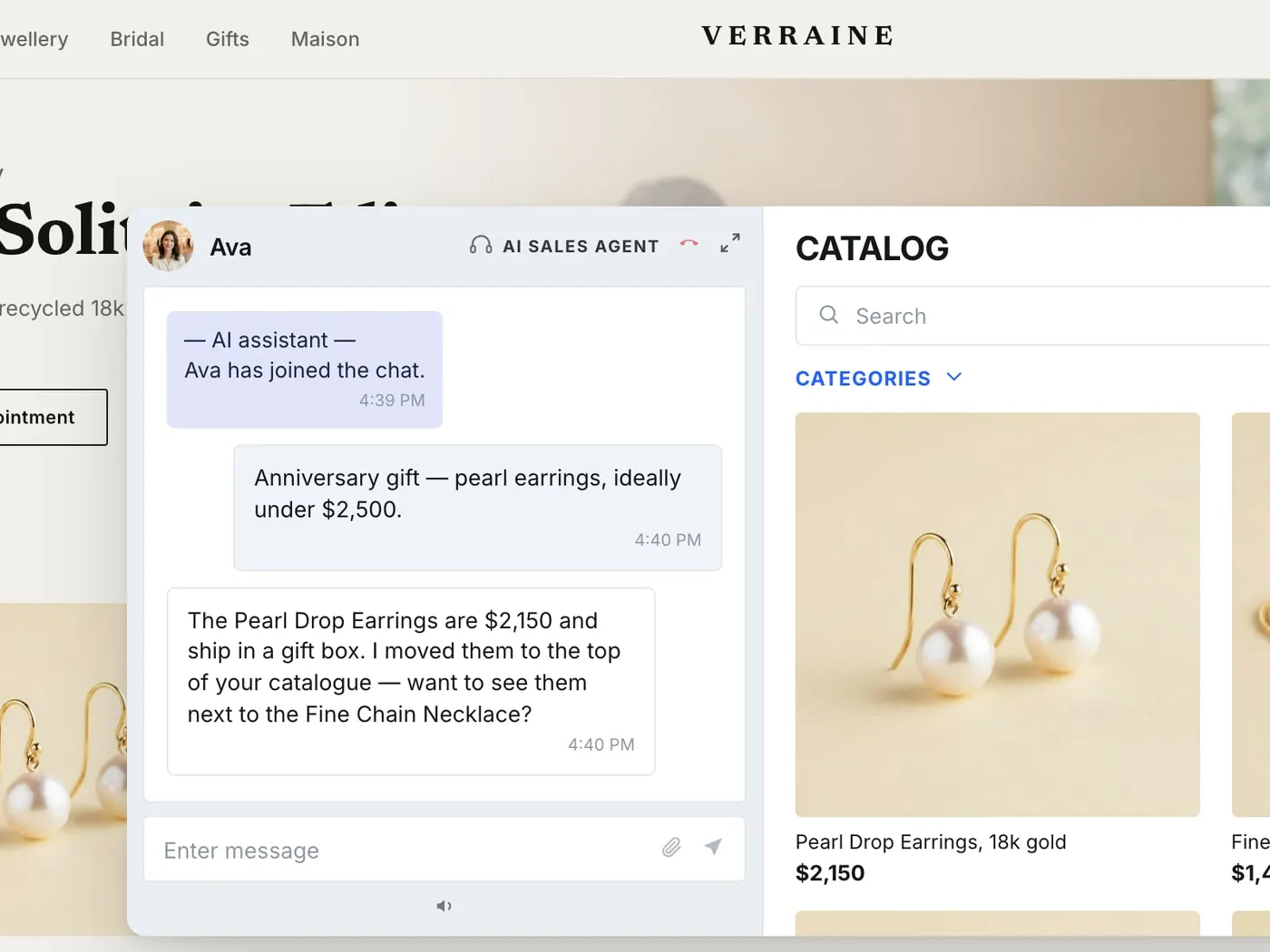
Filling that job is a different category of software from a plugin, and it has three parts. An AI Sales Agent on the product page handles the specific question in the moment, from your catalog rather than from a canned list. Clienteling — one-to-one live co-shopping, plus outbound from your team to known customers — covers the shopper who needs to see the item handled by a person before she will commit. And Video Commerce, whether that is a live shopping event, shoppable video or video on the product page itself, answers in advance the questions that photographs structurally cannot. The distinction between that category and a chat widget is worth being precise about, and we have drawn it in detail in our AI sales agent vs chatbot vs live commerce comparison.
How to improve WooCommerce conversion rate: a six-step framework
Step 1 — Split the funnel. Measure product-page-to-cart and cart-to-completed-order separately, by device. This tells you whether you have a checkout problem or a decision problem before you spend anything on either.
Step 2 — Audit by job. List every plugin and the job it performs in your own words. Remove duplicates. Note which jobs are uncovered.
Step 3 — Fix performance if it is genuinely slow. Caching, image optimization, and removing global asset loading from single-page plugins. Speed has a floor: once you are fast, faster stops buying conversions, so do not over-invest here.
Step 4 — Strip the checkout. Guest checkout on, unnecessary fields off, address autocomplete on, express payment methods enabled.
Step 5 — Mine the inbox. Read the last hundred pre-purchase messages, cluster them, and publish anything that appears repeatedly directly in the product description or image set — not on a global FAQ page, where the shopper who needed it will never look.
Step 6 — Fill the answering job for the tail. The unpredictable remainder is not a content problem, because you cannot anticipate it. It needs something that responds rather than displays: an AI sales agent on the product page for the specific question, with escalation to a person on live video when someone needs to see the item handled before she will buy it.
The inbox in step 5 is worth a sentence of its own. It is not a support-volume metric — it is the visible edge of a much larger population of blocked purchases, and the only sample of that population you have. The shoppers who wrote to you are the ones who cared enough to type. The ones who did not write are the reason this job matters.
Does site speed matter more on WooCommerce?
Speed carries more weight on WooCommerce than on hosted platforms, because nothing is optimized by default and plugin choices directly determine page weight.
Practical priorities: page caching, image compression and correct sizing, limiting plugins that enqueue scripts globally, and a host appropriate to your traffic. Shared hosting that was fine at launch is a common silent cause of drift.
That said, speed has a ceiling as an explanation. If your deficit is concentrated in product-page-to-cart rather than checkout completion, the shopper left while deciding — and no amount of additional speed addresses an unanswered question.
How do you measure WooCommerce conversion properly?
Measure by segment rather than as a single blended number, because the blended figure moves with traffic mix independently of anything you changed.
Track monthly:
- Conversion rate by device, desktop and mobile separately.
- New versus returning conversion rate, and the ratio between them.
- Product-page-to-cart and cart-to-order, separately.
- Pre-purchase question volume, which most stores never count at all.
WooCommerce analytics plus a properly configured analytics property covers all of this. The common failure is reporting one blended number in which every underlying problem cancels out.
The fourth line is the one to add if you are not already tracking it. Anything you put on the storefront to fill the answering job should be Measurable in the same way the rest of your stack is: which questions were asked, which were resolved in session, which needed a person, and what happened to the sessions afterwards. An answering layer that cannot report that is asking for the same faith the discount wheel asked for.
What this costs, and how to think about the model
Compare pricing models rather than monthly figures, because the figure is the fastest-rotting fact in this category and the model is what determines your bill at your traffic.
The two models you will meet are per-view or per-conversation overage, where a good month bills you afterwards, and traffic bands, where the price is fixed inside a band and moving up a band is a decision you make rather than an invoice you receive. Immerss uses bands, sized by monthly traffic, and each of the three modules has a free tier to start on. The current numbers live on our pricing page rather than in an article, for the same reason we would not trust a competitor’s price quoted in someone else’s blog post.
For a self-hosted store the integration question matters as much as the price. Immerss connects to WooCommerce through an API product feed — the same route it uses for Shopify, Magento and Salesforce Commerce Cloud — so the catalog, inventory and pricing the agent answers from stay in WordPress, where you put them. We have written about fitting this alongside an existing stack in our guide to integrating AI sales with your existing tech stack.
Where to start
You did not choose WooCommerce because you wanted more software. You chose it because you wanted the store to be yours.
The plugin ecosystem gives you every function a store needs and nothing at all for the moment a real person asks a real question — because that was never a function. It is a Human job, it has to feel Personal to the person asking, and it should be Measurable afterwards like everything else you run.
So start with the audit. List your stack by job rather than by count, remove the duplicate, and notice which line is missing. Then decide deliberately whether to fill it, which is the one thing a self-hosted store never does by accident.
If you want to see what the answering layer looks like on your own catalog before committing to anything, book a demo and we will walk your product pages. For brands running a full programme, the entry point is a conversation and a 60-day pilot, on us. For a broader treatment of the category, our pillar guide on AI sales agents covers the ground beneath this one.
Frequently asked questions
There is no reliable universal figure, and your own trend is a better benchmark than any industry average. Conversion varies enormously by category, price point and traffic source, and most published benchmark numbers are aggregated across incompatible business models and republished without a traceable source. Three of your own numbers are worth more than any percentile: conversion split by device, conversion split by new versus returning visitors, and product-page-to-cart measured separately from cart-to-completed-order.
The categories with a real effect are checkout simplification, page performance, product content and on-site search. Widely installed but rarely decisive: discount wheels, exit-intent popups, countdown timers and social-proof notification bars — these are not worthless, but they compete for a single moment of attention and many stores run three at once. The category most stacks leave uncovered entirely is answering a specific shopper's specific question.
There is no correct number, and plugin count is a poor metric — thirty lightweight, well-maintained plugins can outperform twelve heavy ones. The useful test is whether any job is covered more than once and whether each plugin loads assets on pages that do not use it. Audit by job rather than by count: duplicate jobs, global asset loading, abandoned plugins and overlapping caching plugins are what actually cause trouble.
For most conversion categories, yes — the meaningful costs are maintenance and abandonment risk rather than features. Paid plugins tend to have faster security patching, a clearer update cadence, real support when something breaks after a WordPress core update, and a lower chance of being abandoned. Use free plugins freely for anything cosmetic or non-critical, and pay for anything sitting in the payment or checkout path.
Not inherently, but hosted platforms ship more conversion-relevant defaults, so a neglected WooCommerce store will usually underperform a neglected hosted one. The difference is baseline rather than ceiling: a well-built WooCommerce store can match or beat a hosted equivalent because you control every part of the stack. The gap widened in 2026 when Shopify's Spring Edition added a storefront AI agent by default, closing centrally on hosted platforms what stays open on self-hosted stores until the owner closes it deliberately.
Speed carries more weight on WooCommerce than on hosted platforms, because nothing is optimized by default and plugin choices directly determine page weight. Priorities are page caching, image compression and correct sizing, limiting plugins that enqueue scripts globally, and a host appropriate to your traffic. But speed has a ceiling as an explanation: if your deficit sits in product-page-to-cart rather than checkout completion, the shopper left while deciding, and no amount of additional speed answers an unanswered question.
It depends on the plugin's asset behaviour, not on the count. A plugin that loads a small script on product pages only has negligible impact; one that enqueues a large bundle site-wide is costly even if you use it on a single page. Audit by what loads where.
Most of it, yes. Checkout settings, plugin auditing, product content and inbox mining are configuration and editorial work. A developer helps with theme-level performance and template changes, but that is rarely where the largest gain sits.
No plugin can answer a shopper's question about her own situation, because that is not a function with a defined input. Plugins handle what a store must do — take payment, calculate tax, show variants, display a chart, filter a catalog. An FAQ plugin displays answers to anticipated questions, a size chart displays a table, and a reviews plugin displays what other people said about their situations. None of them answers hers, and shoppers work that out within seconds.